
- Tham gia
- 09/09/2018
- Bài viết
- 36
mọi người cho mình hỏi làm sao playerpoints khi member đăng ký
playerpoints tự thêm
playerpoints 10 vào tai khoản đó nhỉ
playerpoints tự thêm
playerpoints 10 vào tai khoản đó nhỉ


# This configuration file allows you to execute commands on various events.
# Supported placeholders in commands:
#   %p is replaced with the player name.
#   %nick is replaced with the player's nick name
#   %ip is replaced with the player's IP address
#   %country is replaced with the player's country
#
# For example, if you want to send a welcome message to a player who just registered:
# onRegister:
#   welcome:
#     command: 'msg %p Welcome to the server!'
#     executor: CONSOLE
#
# This will make the console execute the msg command to the player.
# Each command under an event has a name you can choose freely (e.g. 'welcome' as above),
# after which a mandatory 'command' field defines the command to run,
# and 'executor' defines who will run the command (either PLAYER or CONSOLE). Longer example:
# onLogin:
#   welcome:
#     command: 'msg %p Welcome back!'
#     executor: PLAYER
#   broadcast:
#     command: 'broadcast %p has joined, welcome back!'
#     executor: CONSOLE
#
# Supported command events: onLogin, onSessionLogin, onJoin, onLogout, onRegister, onUnregister
onJoin: {}
onLogin: {}
# These commands are called whenever a logged in player uses /logout or quits.
# The commands are not run if a player that was not logged in quits the server.
# Note: if your server crashes, these commands won't be run, so don't rely on them to undo
# 'onLogin' commands that would be dangerous for non-logged in players to have!
onLogout: {}
onRegister: {}
onSessionLogin: {}
# Commands to run whenever a player is unregistered (by himself, or by an admin)
onUnregister: {} onLogin:
gpoints:
command: 'points give %p 10'
executor: CONSOLEtks nhé tìm mấy bữa nayý là khi vừa đăng kí /register thì 10 Points sẽ được chuyển vào acc đó ???
Bạn vào folder Authme -> commands.yml, khi mở file sẽ ra như này
Bạn sẽ thấy cái onLogin, chỉnh nó như sauMã:# This configuration file allows you to execute commands on various events. # Supported placeholders in commands: # %p is replaced with the player name. # %nick is replaced with the player's nick name # %ip is replaced with the player's IP address # %country is replaced with the player's country # # For example, if you want to send a welcome message to a player who just registered: # onRegister: # welcome: # command: 'msg %p Welcome to the server!' # executor: CONSOLE # # This will make the console execute the msg command to the player. # Each command under an event has a name you can choose freely (e.g. 'welcome' as above), # after which a mandatory 'command' field defines the command to run, # and 'executor' defines who will run the command (either PLAYER or CONSOLE). Longer example: # onLogin: # welcome: # command: 'msg %p Welcome back!' # executor: PLAYER # broadcast: # command: 'broadcast %p has joined, welcome back!' # executor: CONSOLE # # Supported command events: onLogin, onSessionLogin, onJoin, onLogout, onRegister, onUnregister onJoin: {} onLogin: {} # These commands are called whenever a logged in player uses /logout or quits. # The commands are not run if a player that was not logged in quits the server. # Note: if your server crashes, these commands won't be run, so don't rely on them to undo # 'onLogin' commands that would be dangerous for non-logged in players to have! onLogout: {} onRegister: {} onSessionLogin: {} # Commands to run whenever a player is unregistered (by himself, or by an admin) onUnregister: {}
--- Trong đó:Mã:onLogin: gpoints: command: 'points give %p 10' executor: CONSOLE
- onLogin là hành động sau khi login xong
- gPoints là tên của cái hành động đó, đặt gì cũng được nhưng nên đặt theo hoàn cảnh cho dễ nhận biết
- Command là lệnh thực hiện sau khi login xong
- ex cu to là kiểu như dùng lệnh theo loại, dùng kiểu console player gì gì đó đó
----
GOOD LUCK
@@ cứ đăng nhập lại là dc 10 coin sập sớm @@ có cánh nào khác hôngý là khi vừa đăng kí /register thì 10 Points sẽ được chuyển vào acc đó ???
Bạn vào folder Authme -> commands.yml, khi mở file sẽ ra như này
Bạn sẽ thấy cái onLogin, chỉnh nó như sauMã:# This configuration file allows you to execute commands on various events. # Supported placeholders in commands: # %p is replaced with the player name. # %nick is replaced with the player's nick name # %ip is replaced with the player's IP address # %country is replaced with the player's country # # For example, if you want to send a welcome message to a player who just registered: # onRegister: # welcome: # command: 'msg %p Welcome to the server!' # executor: CONSOLE # # This will make the console execute the msg command to the player. # Each command under an event has a name you can choose freely (e.g. 'welcome' as above), # after which a mandatory 'command' field defines the command to run, # and 'executor' defines who will run the command (either PLAYER or CONSOLE). Longer example: # onLogin: # welcome: # command: 'msg %p Welcome back!' # executor: PLAYER # broadcast: # command: 'broadcast %p has joined, welcome back!' # executor: CONSOLE # # Supported command events: onLogin, onSessionLogin, onJoin, onLogout, onRegister, onUnregister onJoin: {} onLogin: {} # These commands are called whenever a logged in player uses /logout or quits. # The commands are not run if a player that was not logged in quits the server. # Note: if your server crashes, these commands won't be run, so don't rely on them to undo # 'onLogin' commands that would be dangerous for non-logged in players to have! onLogout: {} onRegister: {} onSessionLogin: {} # Commands to run whenever a player is unregistered (by himself, or by an admin) onUnregister: {}
--- Trong đó:Mã:onLogin: gpoints: command: 'points give %p 10' executor: CONSOLE
- onLogin là hành động sau khi login xong
- gPoints là tên của cái hành động đó, đặt gì cũng được nhưng nên đặt theo hoàn cảnh cho dễ nhận biết
- Command là lệnh thực hiện sau khi login xong
- ex cu to là kiểu như dùng lệnh theo loại, dùng kiểu console player gì gì đó đó
----
GOOD LUCK
à lộntks nhé tìm mấy bữa nay
*****Nội dung được bổ sung thêm*****
@@ cứ đăng nhập lại là dc 10 coin sập sớm @@ có cánh nào khác hông
 , bạn chỉnh thành onRegister á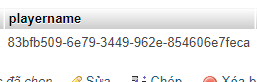
kêu author plugins đi nào
làm sao cho cái dạng này nó thàng tên được nhỉ nó mã hóa khó chịu quá
 (mà hình như k được
  ), cái đó có sao đâu
muốn cho nó thành tên để làm cai danh sach top ấy mà với dể nhìnkêu author plugins đi nào


đấy là UUID của user
làm sao cho cái dạng này nó thàng tên được nhỉ nó mã hóa khó chịu quá

không có cánh nào khi login sẻ cập nhật trong sql coin nhỉđấy là UUID của user
Nói thẳng là reg hay login hay first join được 10 point cũng chả có được đâu
Tình trạng clone lấy points sẽ lên tới đỉnh điểm và sv sẽ nát bét vì point point point không ai không có
Từ bỏ sớm đi


Gợi Ý: Lên google mà tìm<img>i.imgur.com</img>
pluins nay2 ten gi nhi moi nguoi
Cập nhật để làm gì??không có cánh nào khi login sẻ cập nhật trong sql coin nhỉ
hình như là cái này AdvancedIndicator<img>i.imgur.com</img>
pluins nay2 ten gi nhi moi nguoi
ok kkkbài ông đăng toàn mấy ông coder web, cứ nói rõ có thể sẽ giúp được ông,
còn cái ảnh ông cần tìm là mythicmobs nha
ok cái đang tìmhình như là cái này AdvancedIndicator
| N |
Hỏi về Plugin ai biết tất cả lệnh quyền admin ( OP ) trong server ?, set rank, set block?, v..v..
|

|
Hỏi về server xin cách set quyền admin cho user
|

|
Đã giải quyết Ai chỉ mình cách set rank cho member trong sever với
|

|
Config mẫu MoreFish [ VIỆT HÓA, SETUP, 10+ FISH, 3 RARITYS ]
|

|
Thảo luận ngoài lề Leak Setup And Map, Plugins #2
|


