


- Tham gia
- 03/08/2016
- Bài viết
- 32

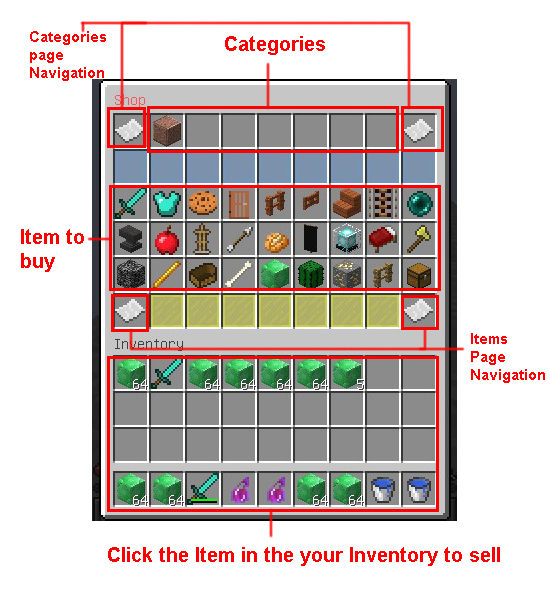
- Nhỏ gọn, dễ sử dụng
- Dễ config
- Hệ thống phân loại item
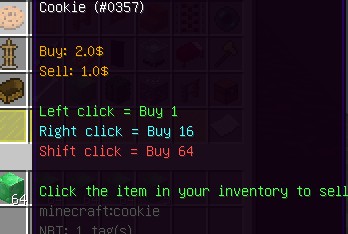
- Nhấn vào GUI để mua và nhấn vào Inventory để bán
- Mua số lượng khác nhau tùy vào cách click
- Không giới hạn thể loại, item
- Bán/mua vật phẩm custom của bạn
- Permission cho việc "Giảm giá"


Yêu cầu: Vault
- Tải plugin và đặt vào folder plugins
- Mở server để plugin tạo file config. Plugin chưa thể chạy được lúc này mà sẽ lỗi.
- Chỉnh sửa và mở lại Server. Lúc này plugin đã nhận được đầy đủ các file config.

Command: /minishop,/mshop,/shop,/mn
/shop - Mở GUI của Shop
/shop help - Các lệnh
/shop reload - Reload config
/shop createcategory <name>
- Tạo category mới - tương tự /shop cc
/shop additem <category> <buy_price> [sell_price]
- Thêm vật phẩm vào category. - tương tự /shop ai
/shop createitem <id>
- Tạo custom item dựa vào vật phẩm trên tay - tương tự /shop ci
/shop addcustomitem <category>
<custom_item_id> <buy_price> [sell_price]
- Thêm custom item đã tạo vào category - tương tự /shop aci
/shop category <category> - Mở shop với category bạn cần được mở sẵn - tương tự /shop c

YAML:
    MiniShop.command.*:
        description: Gives access to all commands
        children:
            MiniShop.command.open: true
            MiniShop.command.reload: true
            MiniShop.command.createcategory: true
            MiniShop.command.additem: true
    MiniShop.command.open:
        description: Allows you to open the GUI.
        default: true
    MiniShop.command.reload:
        description: Allows you to reload the config.
        default: op
    MiniShop.command.createcategory:
        description: Allows you to create a new category.
        children:
            MiniShop.command.cc: true
        default: op
    MiniShop.command.additem:
        description: Allows you to add a new item to a category.
        children:
            MiniShop.command.ai: true
        default: op
    MiniShop.command.addcustomitem:
        description: Allows you to add a existed custom item to a category.
        children:
            MiniShop.command.aci: true
        default: op
    MiniShop.command.createitem:
        description: Allows you to create a custom item.
        children:
            MiniShop.command.ci: true
        default: op
    MiniShop.command.category:
        description: Allows you to open the shop with that category opened by default.
        children:
            MiniShop.command.c: true
        default: op
    MiniShop.category.*:
        description: Allows you to use all the categories.
        default: op
    MiniShop.category.<category_id>: Allows you to see and open that category
    MiniShop.discount.<node>: Allows you to get the discount amount in the config.
YAML:
#Sell the item that changed name or has lore
sellSpecialItem: false
#Amount of different mouse types
amount:
  left: 1
  right: 16
  shift: 64
#Top glasses color. Just change the number, don't remove or put a new line.
topGlass:
- 3
- 3
- 3
- 3
- 3
- 3
- 3
- 3
- 3
#Bottom glasses color. Just change the number, don't remove or put a new line.
bottomGlass:
- 4
- 4
- 4
- 4
- 4
- 4
- 4
#Discount nodes
#Add as more as you want. Give players the permission MiniShop.discount.<node> to let player have that discount.
discount:
  fifty: 50
  total: 100
#The navigation's items
navigation:
  cateNext:
    id: PAPER
    name: "&aNext"
    lore:
    - Next categories page
  catePrevious:
    id: PAPER
    name: "&aBack"
    lore:
    - Previous categories page
  itemNext:
      id: PAPER
      name: "&aNext"
      lore:
      - Next items page
  itemPrevious:
      id: PAPER
      name: "&aBack"
      lore:
      - Previous items page
#Transaction log
transactionLog:
  enable: true
  #Expired in days
  expire: 7
  #Remove expired log?
  expiredRemove: true
#More lore on the item
itemMoreLore:
- "&aClick the item in your inventory to sell"
#messages
messages:
  menuName: "&cShop"
  successBuy: "Successfully bought {amount} {item} for {money}$"
  successSell: "Successfully sold {amount} {item} for {money}$"
  noMoney: "&cYou don't have enough {money}$"
  buyLore: "&6Buy: {money}$"
  sellLore: "&6Sell: {money}$"
  leftClickLore: "&aLeft click = Buy {amount}"
  rightClickLore: "&bRight click = Buy {amount}"
  shiftClickLore: "&cShift click = Buy {amount}"
  specialItem: "&cCan not sell this special item"
  cantSell: "&cCan not sell this item"
  cantBuy: "&cCan not buy this item"
  successReload: "&aSuccessfully reloaded"
  onlyPlayer: "&cThis command can only be ued by player"
  existCategory: "&cCan't create! That category is exist!"
  existCustomItem: "&cCan't create! That custom item is exist!"
  successCreateCate: "&aSuccessfully created category"
  successCreateItem: "&aSuccessfully created item"
  successAddItem: "&aSuccessfully added item"
  noPermission: "&cYou don't have permission to use this command"
  noCategory: "&cNo category found"
  buyLog: "[{time}] {player} bought {amount} {item} for {money}$"
  sellLog: "[{time}] {player} sold {amount} {item} for {money}$"
YAML:
#Name of the category's item
name: "Example Category"
#Id of the item
item: STONE:2
#Lore of the category's item
lore:
- Example category
#List item to buy/sell
list:
  #The id of the item. Find here: https://hub.spigotmc.org/javadocs/spigot/org/bukkit/Material.html
  DIAMOND_SWORD:
  #buy: the cost to buy. 0 mean can't buy
  #sell: the money you'll receive. 0 mean can't sell
    buy: 5
    sell: 0
  #Can use data number too
  "STONE:2":
    buy: 2
    sell: 1
  #custom item. this is the id of the item in items folder.
  exampleitem:
    buy: 2
    sell: 1
  DIAMOND_CHESTPLATE:
    buy: 0
    sell: 1
  ACACIA_DOOR_ITEM:
    buy: 2
    sell: 1
  ACACIA_FENCE:
    buy: 2
    sell: 1
  ACACIA_FENCE_GATE:
    buy: 2
    sell: 1
  ACACIA_STAIRS:
    buy: 2
    sell: 1
  ACTIVATOR_RAIL:
    buy: 2
    sell: 1
  ENDER_PEARL:
    buy: 2
    sell: 1
  ANVIL:
    buy: 2
    sell: 1
  APPLE:
    buy: 2
    sell: 1
  ARMOR_STAND:
    buy: 2
    sell: 1
  ARROW :
    buy: 2
    sell: 1
  BAKED_POTATO:
    buy: 2
    sell: 1
  BANNER:
    buy: 2
    sell: 1
  BEACON:
    buy: 2
    sell: 1
  BED:
    buy: 2
    sell: 1
  GOLD_AXE:
    buy: 2
    sell: 1
  BEDROCK:
    buy: 2
    sell: 1
  BLAZE_ROD:
    buy: 2
    sell: 1
  BOAT :
    buy: 2
    sell: 1
  BONE:
    buy: 2
    sell: 1
  EMERALD_BLOCK:
    buy: 2
    sell: 1
  CACTUS:
    buy: 2
    sell: 1
  GOLD_ORE:
    buy: 2
    sell: 1
  FENCE:
    buy: 2
    sell: 1
  CHEST:
    buy: 2
    sell: 1
  COOKED_FISH:
    buy: 2
    sell: 1
  DIAMOND_AXE:
    buy: 2
    sell: 1
  DIAMOND_HOE:
    buy: 2
    sell: 1
  DIAMOND_PICKAXE:
    buy: 2
    sell: 1
YAML:
name: "Example custom item"
id: DIAMOND_SWORD
lore:
- A lore
- Another lore
#Enchantment id: https://hub.spigotmc.org/javadocs/spigot/org/bukkit/enchantments/Enchantment.html
#Struct: <enchantment_id> <level>
enchantment:
- DAMAGE_ALL 1
- LUCK 1
https://www.spigotmc.org/resources/minishop.22234/

Hướng dẫn tạo category
Bạn sẽ thấy thư mục categories . Mọi category đều đặt ở đây.
Để tạo category mới chỉ cần tạo một file .yml với cấu trúc như ví dụ.
Cách khác, bạn có thể dùng /shop cc. Cầm vật phẩm trên tay và dùng lệnh này sẽ tạo category mới với hình đại diện cho category là vật phẩm trên tay. Name, lore của vật phẩm sẽ tự động áp dụng cho item này.
Cách thêm vật phẩm vào category
Bạn có thể sửa .yml của category. Nó rất đơn giản. Chỉ cần nhìn vào ví dụ là bạn có thể hiểu được.
Và tương tự như tạo category, bạn có thể dùng lệnh /shop ai để thêm vật phẩm vào category.
Cách tạo vật phẩm custom và thêm vào shop
Bạn chỉ cần tạo file .yml trong folder items. Tên của file sẽ là ID của item. Sau đó bạn có thể tham khảo exampleitem.yml để biết cấu trúc.
Một cách đơn giản hơn là dùng lệnh /shop createitem <id> để tạo custom item dựa vào vật phẩm đang cầm trên tay.
Để thêm vật phẩm custom vào category, bạn chỉ cần ghi ID của vật phẩm (tên file của vật phẩm custom) trong file config category tương tự như material id trong ví dụ. Hoặc bạn có thể dùng lệnh /shop addcustomitem <category_id> <custom_item_id> <buy> [sell]


 )
)


