• Chào bạn, hãy đăng ký hoặc đăng nhập để tham gia cùng bọn mình và sử dụng được đầy đủ chức năng của diễn đàn :).
Vịt mèo

Đã giải quyết [Đăng giúp] Minecraft bị Crash!

Trạng thái
Không mở trả lời sau này.

Vịt mèo

THÀNH VIÊN
Tham gia
26/01/2017
Bài viết
261
Thằng bạn mình khi vào minecraft thì bị crash ngay, ai biết fix thì mong giúp đỡ
Crash report:

Mã:
---- Minecraft Crash Report ----
// Surprise! Haha. Well, this is awkward.

Time: 3/24/17 6:07 PM
Description: Initializing game

org.lwjgl.LWJGLException: Pixel format not accelerated
    at org.lwjgl.opengl.WindowsPeerInfo.nChoosePixelFormat(Native Method)
    at org.lwjgl.opengl.WindowsPeerInfo.choosePixelFormat(WindowsPeerInfo.java:52)
    at org.lwjgl.opengl.WindowsDisplay.createWindow(WindowsDisplay.java:247)
    at org.lwjgl.opengl.Display.createWindow(Display.java:306)
    at org.lwjgl.opengl.Display.create(Display.java:848)
    at org.lwjgl.opengl.Display.create(Display.java:757)
    at org.lwjgl.opengl.Display.create(Display.java:739)
    at bcx.ap(SourceFile:598)
    at bcx.an(SourceFile:434)
    at bcx.a(SourceFile:381)
    at net.minecraft.client.main.Main.main(SourceFile:124)
    at sun.reflect.NativeMethodAccessorImpl.invoke0(Native Method)
    at sun.reflect.NativeMethodAccessorImpl.invoke(Unknown Source)
    at sun.reflect.DelegatingMethodAccessorImpl.invoke(Unknown Source)
    at java.lang.reflect.Method.invoke(Unknown Source)
    at net.minecraft.launchwrapper.Launch.launch(Launch.java:131)
    at net.minecraft.launchwrapper.Launch.main(Launch.java:27)


A detailed walkthrough of the error, its code path and all known details is as follows:
---------------------------------------------------------------------------------------

-- Head --
Thread: Client thread
Stacktrace:
    at org.lwjgl.opengl.WindowsPeerInfo.nChoosePixelFormat(Native Method)
    at org.lwjgl.opengl.WindowsPeerInfo.choosePixelFormat(WindowsPeerInfo.java:52)
    at org.lwjgl.opengl.WindowsDisplay.createWindow(WindowsDisplay.java:247)
    at org.lwjgl.opengl.Display.createWindow(Display.java:306)
    at org.lwjgl.opengl.Display.create(Display.java:848)
    at org.lwjgl.opengl.Display.create(Display.java:757)
    at org.lwjgl.opengl.Display.create(Display.java:739)
    at bcx.ap(SourceFile:598)
    at bcx.an(SourceFile:434)

-- Initialization --
Details:
Stacktrace:
    at bcx.a(SourceFile:381)
    at net.minecraft.client.main.Main.main(SourceFile:124)
    at sun.reflect.NativeMethodAccessorImpl.invoke0(Native Method)
    at sun.reflect.NativeMethodAccessorImpl.invoke(Unknown Source)
    at sun.reflect.DelegatingMethodAccessorImpl.invoke(Unknown Source)
    at java.lang.reflect.Method.invoke(Unknown Source)
    at net.minecraft.launchwrapper.Launch.launch(Launch.java:131)
    at net.minecraft.launchwrapper.Launch.main(Launch.java:27)

-- System Details --
Details:
    Minecraft Version: 1.10.2
    Operating System: Windows 7 (x86) version 6.1
    Java Version: 1.8.0_121, Oracle Corporation
    Java VM Version: Java HotSpot(TM) Client VM (mixed mode), Oracle Corporation
    Memory: 130209368 bytes (124 MB) / 255066112 bytes (243 MB) up to 791937024 bytes (755 MB)
    JVM Flags: 10 total; -XX:HeapDumpPath=ThisTricksIntelDriversForPerformance_javaw.exe_minecraft.exe.heapdump -Xmx768M -Xms256M -Xmn128M -XX:+UseConcMarkSweepGC -XX:-UseAdaptiveSizePolicy -XX:+CMSParallelRemarkEnabled -XX:+ParallelRefProcEnabled -XX:+CMSClassUnloadingEnabled -XX:+UseCMSInitiatingOccupancyOnly
    IntCache: cache: 0, tcache: 0, allocated: 0, tallocated: 0
    Launched Version: OptiFine 1.10.2
    LWJGL: 2.9.4
    OpenGL: ~~ERROR~~ RuntimeException: No OpenGL context found in the current thread.
    GL Caps:
    Using VBOs: Yes
    Is Modded: Very likely; Jar signature invalidated
    Type: Client (map_client.txt)
    Resource Packs:
    Current Language: ~~ERROR~~ NullPointerException: null
    Profiler Position: N/A (disabled)
    CPU: <unknown>
    OptiFine Version: OptiFine_1.10.2_HD_U_D4
    Render Distance Chunks: 8
    Mipmaps: 4
    Anisotropic Filtering: 1
    Antialiasing: 0
    Multitexture: false
    Shaders: null
    OpenGlVersion: null
    OpenGlRenderer: null
    OpenGlVendor: null
    CpuCount: 2
 
Thằng bạn mình khi vào minecraft thì bị crash ngay, ai biết fix thì mong giúp đỡ
Crash report:

Mã:
---- Minecraft Crash Report ----
// Surprise! Haha. Well, this is awkward.

Time: 3/24/17 6:07 PM
Description: Initializing game

org.lwjgl.LWJGLException: Pixel format not accelerated
    at org.lwjgl.opengl.WindowsPeerInfo.nChoosePixelFormat(Native Method)
    at org.lwjgl.opengl.WindowsPeerInfo.choosePixelFormat(WindowsPeerInfo.java:52)
    at org.lwjgl.opengl.WindowsDisplay.createWindow(WindowsDisplay.java:247)
    at org.lwjgl.opengl.Display.createWindow(Display.java:306)
    at org.lwjgl.opengl.Display.create(Display.java:848)
    at org.lwjgl.opengl.Display.create(Display.java:757)
    at org.lwjgl.opengl.Display.create(Display.java:739)
    at bcx.ap(SourceFile:598)
    at bcx.an(SourceFile:434)
    at bcx.a(SourceFile:381)
    at net.minecraft.client.main.Main.main(SourceFile:124)
    at sun.reflect.NativeMethodAccessorImpl.invoke0(Native Method)
    at sun.reflect.NativeMethodAccessorImpl.invoke(Unknown Source)
    at sun.reflect.DelegatingMethodAccessorImpl.invoke(Unknown Source)
    at java.lang.reflect.Method.invoke(Unknown Source)
    at net.minecraft.launchwrapper.Launch.launch(Launch.java:131)
    at net.minecraft.launchwrapper.Launch.main(Launch.java:27)


A detailed walkthrough of the error, its code path and all known details is as follows:
---------------------------------------------------------------------------------------

-- Head --
Thread: Client thread
Stacktrace:
    at org.lwjgl.opengl.WindowsPeerInfo.nChoosePixelFormat(Native Method)
    at org.lwjgl.opengl.WindowsPeerInfo.choosePixelFormat(WindowsPeerInfo.java:52)
    at org.lwjgl.opengl.WindowsDisplay.createWindow(WindowsDisplay.java:247)
    at org.lwjgl.opengl.Display.createWindow(Display.java:306)
    at org.lwjgl.opengl.Display.create(Display.java:848)
    at org.lwjgl.opengl.Display.create(Display.java:757)
    at org.lwjgl.opengl.Display.create(Display.java:739)
    at bcx.ap(SourceFile:598)
    at bcx.an(SourceFile:434)

-- Initialization --
Details:
Stacktrace:
    at bcx.a(SourceFile:381)
    at net.minecraft.client.main.Main.main(SourceFile:124)
    at sun.reflect.NativeMethodAccessorImpl.invoke0(Native Method)
    at sun.reflect.NativeMethodAccessorImpl.invoke(Unknown Source)
    at sun.reflect.DelegatingMethodAccessorImpl.invoke(Unknown Source)
    at java.lang.reflect.Method.invoke(Unknown Source)
    at net.minecraft.launchwrapper.Launch.launch(Launch.java:131)
    at net.minecraft.launchwrapper.Launch.main(Launch.java:27)

-- System Details --
Details:
    Minecraft Version: 1.10.2
    Operating System: Windows 7 (x86) version 6.1
    Java Version: 1.8.0_121, Oracle Corporation
    Java VM Version: Java HotSpot(TM) Client VM (mixed mode), Oracle Corporation
    Memory: 130209368 bytes (124 MB) / 255066112 bytes (243 MB) up to 791937024 bytes (755 MB)
    JVM Flags: 10 total; -XX:HeapDumpPath=ThisTricksIntelDriversForPerformance_javaw.exe_minecraft.exe.heapdump -Xmx768M -Xms256M -Xmn128M -XX:+UseConcMarkSweepGC -XX:-UseAdaptiveSizePolicy -XX:+CMSParallelRemarkEnabled -XX:+ParallelRefProcEnabled -XX:+CMSClassUnloadingEnabled -XX:+UseCMSInitiatingOccupancyOnly
    IntCache: cache: 0, tcache: 0, allocated: 0, tallocated: 0
    Launched Version: OptiFine 1.10.2
    LWJGL: 2.9.4
    OpenGL: ~~ERROR~~ RuntimeException: No OpenGL context found in the current thread.
    GL Caps:
    Using VBOs: Yes
    Is Modded: Very likely; Jar signature invalidated
    Type: Client (map_client.txt)
    Resource Packs:
    Current Language: ~~ERROR~~ NullPointerException: null
    Profiler Position: N/A (disabled)
    CPU: <unknown>
    OptiFine Version: OptiFine_1.10.2_HD_U_D4
    Render Distance Chunks: 8
    Mipmaps: 4
    Anisotropic Filtering: 1
    Antialiasing: 0
    Multitexture: false
    Shaders: null
    OpenGlVersion: null
    OpenGlRenderer: null
    OpenGlVendor: null
    CpuCount: 2
thử vào run -> %appdata% -> .minecraft -> versions
xóa vái versions đang xài ùi vào lại thử
 
thử vào run -> %appdata% -> .minecraft -> versions
xóa vái versions đang xài ùi vào lại thử
có làm rồi, dùng laucher thứ 1 ko vào đc, xóa hết cả file lẫn laucher, tải Tlaucher vào k đc nốt!
 
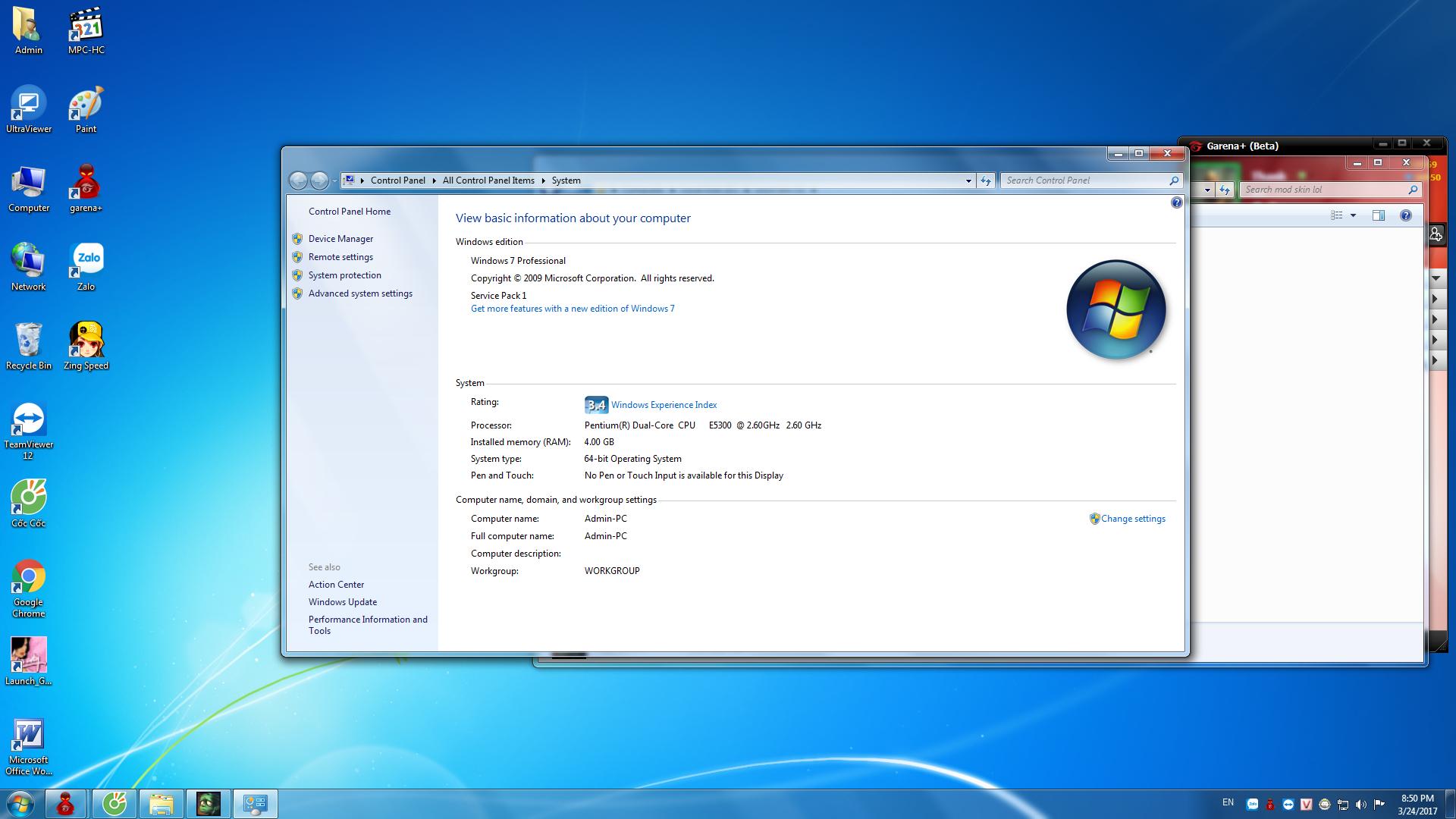
cho coi cấu hình pc của bạn đó
iTPwQOy.jpg
 
thử cập nhật drivers dj có khi lỗi card
 
set ram cho minecraft nhiều lên ... có 756M .-. làm ăn được j
 
Trạng thái
Không mở trả lời sau này.
Similar content Most view Xem thêm
Back
Top Bottom