


Plugin có giá 5,99 USD trên SpigotMC, ai có điều kiện thì mua ủng hộ tác giả.
Phiên bản: 1.8 - 1.11
Chức năng: Làm cho túi đồ có các trang như sách => Tăng diện tích. (Max 100 Pages).

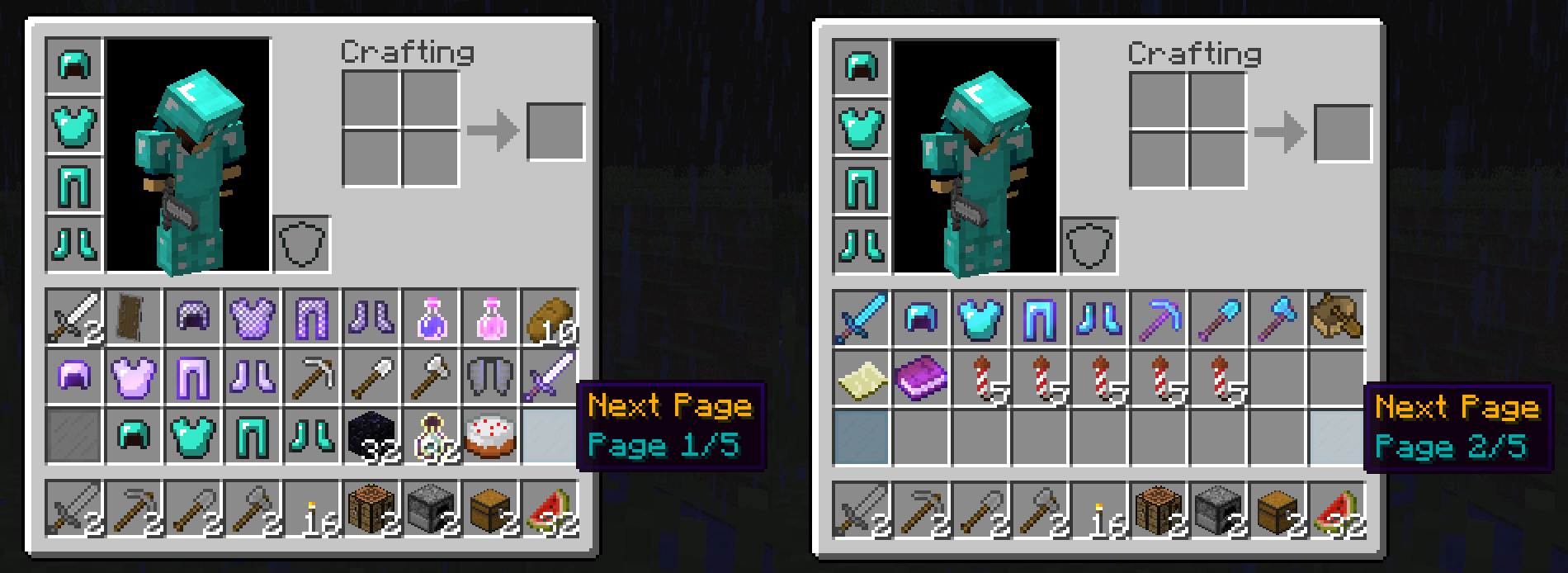
Xem thêm: https://www.spigotmc.org/resources/inventorypages.32432/
Link tải: http://www.mediafire.com/file/i74dsie6mv953eo/InventoryPages.jar
Phiên bản: 1.8 - 1.11
Chức năng: Làm cho túi đồ có các trang như sách => Tăng diện tích. (Max 100 Pages).
- /clear - remove all items from your current page and hotbar.
- Aliases: /clearinventory, /clearinvent, /ci, /clean
- Note: Aliases can be changed in the config.
- /clear all - remove all items from all pages and hotbar.
- Aliases: /clearinventory all, /clearinvent all, /ci all, /clean all
- Note: Aliases can be changed in the config.
InventoryPages has the following permissions:
- inventorypages.pages.[number] - add pages to your inventory.
- You can use any number between 2 and 100
- Ex. inventorypages.pages.5 will give you 5 pages.
- inventorypages.clear - allows you to use /clear to clear your inventory.
- inventorypages.drop.one - only drop your current page and hotbar on death.
- inventorypages.drop.none - do not drop any items on death.
- inventorypages.pages.[number] - add pages to your inventory.
Mã:
# Configuration file for InventoryPages
# Created by KevinNovak

# ============================================
# Metrics
# ============================================
# Whether or not to collect data on plugin usage
# Viewable at http://mcstats.org/plugin/InventoryPages/
metrics: true

# ============================================
# Items
# ============================================
# ID
#   Any item ID
#   See http://minecraft-ids.grahamedgecombe.com/ for item IDs
#
# variation
#   The item variation
#   Typically this occurs after the colon symbol ":"
#     Ex. Diorite is "1:3" so the ID is 1, and the variation is 3
#   Set as 0 if there is no variation
#     Ex. Cobblestone is "4" so the ID is 4, and the variation is 0
#
# position
#   Inventory positions:
#   ----------------------------------------------
#   |  0 |  1 |  2 |  3 |  4 |  5 |  6 |  7 |  8 |
#   ----------------------------------------------
#   |  9 | 10 | 11 | 12 | 13 | 14 | 15 | 16 | 17 |
#   ----------------------------------------------
#   | 18 | 19 | 20 | 21 | 22 | 23 | 24 | 25 | 26 |
#   ----------------------------------------------
#   Hotbar: (Not usable)
#   ----------------------------------------------
#   |    |    |    |    |    |    |    |    |    |
#   ----------------------------------------------
#
# name
#   The item name
#   Color codes are supported
#     See http://minecraft.gamepedia.com/Formatting_codes for color codes
#     Use the ampersand symbol "&" before the color code number
#       Ex. "&6" would be gold.
#
# lore
#   Item lore
#   Color codes also apply here
#   Place the variable "{CURRENT}" where you would like the current inventory page number
#   Place the variable "{MAX}" where you would like the max inventory page number

items:
   # The previous page button item
    prev:
        ID: 160
        variation: 9
        position: 18
        name: '&6Prev Page'
        lore:
       - '&3Page {CURRENT}/{MAX}'

    # The next page button item
    next:
        ID: 160
        variation: 9
        position: 26
        name: '&6Next Page'
        lore:
       - '&3Page {CURRENT}/{MAX}'

    # The no page button item
    noPage:
        ID: 160
        variation: 7
        name: '&6No Pages'
        lore:
       - '&3Page {CURRENT}/{MAX}'

# ============================================
# Commands
# ============================================
commands:
   # Clears the current page and hotbar
    #   Add "all" after a clear command to clear all pages and hotbar
    clear:
       # Will override any existing commands with same name
        aliases:
       - 'clear'
        - 'clearinventory'
        - 'clearinvent'
        - 'ci'
        - 'clean'

# ============================================
# Saving
# ============================================
saving:
   # Recommended to keep enabled
    #   If disabled, inventories are only saved when players leave the server
    enabled: true
    # How often should inventories be saved to files, in seconds
    interval: 900

# ============================================
# Logging
# ============================================
logging:
    saves:
       # Show in the console when inventories are saved
        enabled: true
        # Message to be shown in the console
        message: 'All inventories have been saved.'

# ============================================
# Language
# ============================================
# Color codes are supported
#   See http://minecraft.gamepedia.com/Formatting_codes for color codes
#   Use the ampersand symbol "&" before the color code number
#     Ex. "&6" would be gold.
language:
    noPermission: '&4You do not have access to that command.'
    clear: '&6Cleared inventory items from hotbar and current page.'
    clearAll: '&6Cleared inventory items from hotbar and all pages.'
    itemsMerged: '&7Items have been moved to your inventory pages.'
itemsDropped: '&cYour inventory is full, some items have been dropped.'Link tải: http://www.mediafire.com/file/i74dsie6mv953eo/InventoryPages.jar


Sửa lần cuối:


