• Trong thời gian này, bạn không thể tạo bài mới, đăng comment, hay tạo tài nguyên mới để diễn đàn dọn dẹp nội dung.
    Diễn đàn sẽ sớm mở trở lại, chi tiết hãy theo dõi tại Discord
Vịt mèo

Đã giải quyết [Đăng giúp] Minecraft bị Crash!

  • Người tạo chủ đề Người tạo chủ đề Vịt mèo
  • Ngày gửi Ngày gửi
Trạng thái
Không mở trả lời sau này.
Thằng bạn mình khi vào minecraft thì bị crash ngay, ai biết fix thì mong giúp đỡ
Crash report:

Mã:
---- Minecraft Crash Report ----
// Surprise! Haha. Well, this is awkward.

Time: 3/24/17 6:07 PM
Description: Initializing game

org.lwjgl.LWJGLException: Pixel format not accelerated
    at org.lwjgl.opengl.WindowsPeerInfo.nChoosePixelFormat(Native Method)
    at org.lwjgl.opengl.WindowsPeerInfo.choosePixelFormat(WindowsPeerInfo.java:52)
    at org.lwjgl.opengl.WindowsDisplay.createWindow(WindowsDisplay.java:247)
    at org.lwjgl.opengl.Display.createWindow(Display.java:306)
    at org.lwjgl.opengl.Display.create(Display.java:848)
    at org.lwjgl.opengl.Display.create(Display.java:757)
    at org.lwjgl.opengl.Display.create(Display.java:739)
    at bcx.ap(SourceFile:598)
    at bcx.an(SourceFile:434)
    at bcx.a(SourceFile:381)
    at net.minecraft.client.main.Main.main(SourceFile:124)
    at sun.reflect.NativeMethodAccessorImpl.invoke0(Native Method)
    at sun.reflect.NativeMethodAccessorImpl.invoke(Unknown Source)
    at sun.reflect.DelegatingMethodAccessorImpl.invoke(Unknown Source)
    at java.lang.reflect.Method.invoke(Unknown Source)
    at net.minecraft.launchwrapper.Launch.launch(Launch.java:131)
    at net.minecraft.launchwrapper.Launch.main(Launch.java:27)


A detailed walkthrough of the error, its code path and all known details is as follows:
---------------------------------------------------------------------------------------

-- Head --
Thread: Client thread
Stacktrace:
    at org.lwjgl.opengl.WindowsPeerInfo.nChoosePixelFormat(Native Method)
    at org.lwjgl.opengl.WindowsPeerInfo.choosePixelFormat(WindowsPeerInfo.java:52)
    at org.lwjgl.opengl.WindowsDisplay.createWindow(WindowsDisplay.java:247)
    at org.lwjgl.opengl.Display.createWindow(Display.java:306)
    at org.lwjgl.opengl.Display.create(Display.java:848)
    at org.lwjgl.opengl.Display.create(Display.java:757)
    at org.lwjgl.opengl.Display.create(Display.java:739)
    at bcx.ap(SourceFile:598)
    at bcx.an(SourceFile:434)

-- Initialization --
Details:
Stacktrace:
    at bcx.a(SourceFile:381)
    at net.minecraft.client.main.Main.main(SourceFile:124)
    at sun.reflect.NativeMethodAccessorImpl.invoke0(Native Method)
    at sun.reflect.NativeMethodAccessorImpl.invoke(Unknown Source)
    at sun.reflect.DelegatingMethodAccessorImpl.invoke(Unknown Source)
    at java.lang.reflect.Method.invoke(Unknown Source)
    at net.minecraft.launchwrapper.Launch.launch(Launch.java:131)
    at net.minecraft.launchwrapper.Launch.main(Launch.java:27)

-- System Details --
Details:
    Minecraft Version: 1.10.2
    Operating System: Windows 7 (x86) version 6.1
    Java Version: 1.8.0_121, Oracle Corporation
    Java VM Version: Java HotSpot(TM) Client VM (mixed mode), Oracle Corporation
    Memory: 130209368 bytes (124 MB) / 255066112 bytes (243 MB) up to 791937024 bytes (755 MB)
    JVM Flags: 10 total; -XX:HeapDumpPath=ThisTricksIntelDriversForPerformance_javaw.exe_minecraft.exe.heapdump -Xmx768M -Xms256M -Xmn128M -XX:+UseConcMarkSweepGC -XX:-UseAdaptiveSizePolicy -XX:+CMSParallelRemarkEnabled -XX:+ParallelRefProcEnabled -XX:+CMSClassUnloadingEnabled -XX:+UseCMSInitiatingOccupancyOnly
    IntCache: cache: 0, tcache: 0, allocated: 0, tallocated: 0
    Launched Version: OptiFine 1.10.2
    LWJGL: 2.9.4
    OpenGL: ~~ERROR~~ RuntimeException: No OpenGL context found in the current thread.
    GL Caps:
    Using VBOs: Yes
    Is Modded: Very likely; Jar signature invalidated
    Type: Client (map_client.txt)
    Resource Packs:
    Current Language: ~~ERROR~~ NullPointerException: null
    Profiler Position: N/A (disabled)
    CPU: <unknown>
    OptiFine Version: OptiFine_1.10.2_HD_U_D4
    Render Distance Chunks: 8
    Mipmaps: 4
    Anisotropic Filtering: 1
    Antialiasing: 0
    Multitexture: false
    Shaders: null
    OpenGlVersion: null
    OpenGlRenderer: null
    OpenGlVendor: null
    CpuCount: 2
 
Thằng bạn mình khi vào minecraft thì bị crash ngay, ai biết fix thì mong giúp đỡ
Crash report:

Mã:
---- Minecraft Crash Report ----
// Surprise! Haha. Well, this is awkward.

Time: 3/24/17 6:07 PM
Description: Initializing game

org.lwjgl.LWJGLException: Pixel format not accelerated
    at org.lwjgl.opengl.WindowsPeerInfo.nChoosePixelFormat(Native Method)
    at org.lwjgl.opengl.WindowsPeerInfo.choosePixelFormat(WindowsPeerInfo.java:52)
    at org.lwjgl.opengl.WindowsDisplay.createWindow(WindowsDisplay.java:247)
    at org.lwjgl.opengl.Display.createWindow(Display.java:306)
    at org.lwjgl.opengl.Display.create(Display.java:848)
    at org.lwjgl.opengl.Display.create(Display.java:757)
    at org.lwjgl.opengl.Display.create(Display.java:739)
    at bcx.ap(SourceFile:598)
    at bcx.an(SourceFile:434)
    at bcx.a(SourceFile:381)
    at net.minecraft.client.main.Main.main(SourceFile:124)
    at sun.reflect.NativeMethodAccessorImpl.invoke0(Native Method)
    at sun.reflect.NativeMethodAccessorImpl.invoke(Unknown Source)
    at sun.reflect.DelegatingMethodAccessorImpl.invoke(Unknown Source)
    at java.lang.reflect.Method.invoke(Unknown Source)
    at net.minecraft.launchwrapper.Launch.launch(Launch.java:131)
    at net.minecraft.launchwrapper.Launch.main(Launch.java:27)


A detailed walkthrough of the error, its code path and all known details is as follows:
---------------------------------------------------------------------------------------

-- Head --
Thread: Client thread
Stacktrace:
    at org.lwjgl.opengl.WindowsPeerInfo.nChoosePixelFormat(Native Method)
    at org.lwjgl.opengl.WindowsPeerInfo.choosePixelFormat(WindowsPeerInfo.java:52)
    at org.lwjgl.opengl.WindowsDisplay.createWindow(WindowsDisplay.java:247)
    at org.lwjgl.opengl.Display.createWindow(Display.java:306)
    at org.lwjgl.opengl.Display.create(Display.java:848)
    at org.lwjgl.opengl.Display.create(Display.java:757)
    at org.lwjgl.opengl.Display.create(Display.java:739)
    at bcx.ap(SourceFile:598)
    at bcx.an(SourceFile:434)

-- Initialization --
Details:
Stacktrace:
    at bcx.a(SourceFile:381)
    at net.minecraft.client.main.Main.main(SourceFile:124)
    at sun.reflect.NativeMethodAccessorImpl.invoke0(Native Method)
    at sun.reflect.NativeMethodAccessorImpl.invoke(Unknown Source)
    at sun.reflect.DelegatingMethodAccessorImpl.invoke(Unknown Source)
    at java.lang.reflect.Method.invoke(Unknown Source)
    at net.minecraft.launchwrapper.Launch.launch(Launch.java:131)
    at net.minecraft.launchwrapper.Launch.main(Launch.java:27)

-- System Details --
Details:
    Minecraft Version: 1.10.2
    Operating System: Windows 7 (x86) version 6.1
    Java Version: 1.8.0_121, Oracle Corporation
    Java VM Version: Java HotSpot(TM) Client VM (mixed mode), Oracle Corporation
    Memory: 130209368 bytes (124 MB) / 255066112 bytes (243 MB) up to 791937024 bytes (755 MB)
    JVM Flags: 10 total; -XX:HeapDumpPath=ThisTricksIntelDriversForPerformance_javaw.exe_minecraft.exe.heapdump -Xmx768M -Xms256M -Xmn128M -XX:+UseConcMarkSweepGC -XX:-UseAdaptiveSizePolicy -XX:+CMSParallelRemarkEnabled -XX:+ParallelRefProcEnabled -XX:+CMSClassUnloadingEnabled -XX:+UseCMSInitiatingOccupancyOnly
    IntCache: cache: 0, tcache: 0, allocated: 0, tallocated: 0
    Launched Version: OptiFine 1.10.2
    LWJGL: 2.9.4
    OpenGL: ~~ERROR~~ RuntimeException: No OpenGL context found in the current thread.
    GL Caps:
    Using VBOs: Yes
    Is Modded: Very likely; Jar signature invalidated
    Type: Client (map_client.txt)
    Resource Packs:
    Current Language: ~~ERROR~~ NullPointerException: null
    Profiler Position: N/A (disabled)
    CPU: <unknown>
    OptiFine Version: OptiFine_1.10.2_HD_U_D4
    Render Distance Chunks: 8
    Mipmaps: 4
    Anisotropic Filtering: 1
    Antialiasing: 0
    Multitexture: false
    Shaders: null
    OpenGlVersion: null
    OpenGlRenderer: null
    OpenGlVendor: null
    CpuCount: 2
thử vào run -> %appdata% -> .minecraft -> versions
xóa vái versions đang xài ùi vào lại thử
 
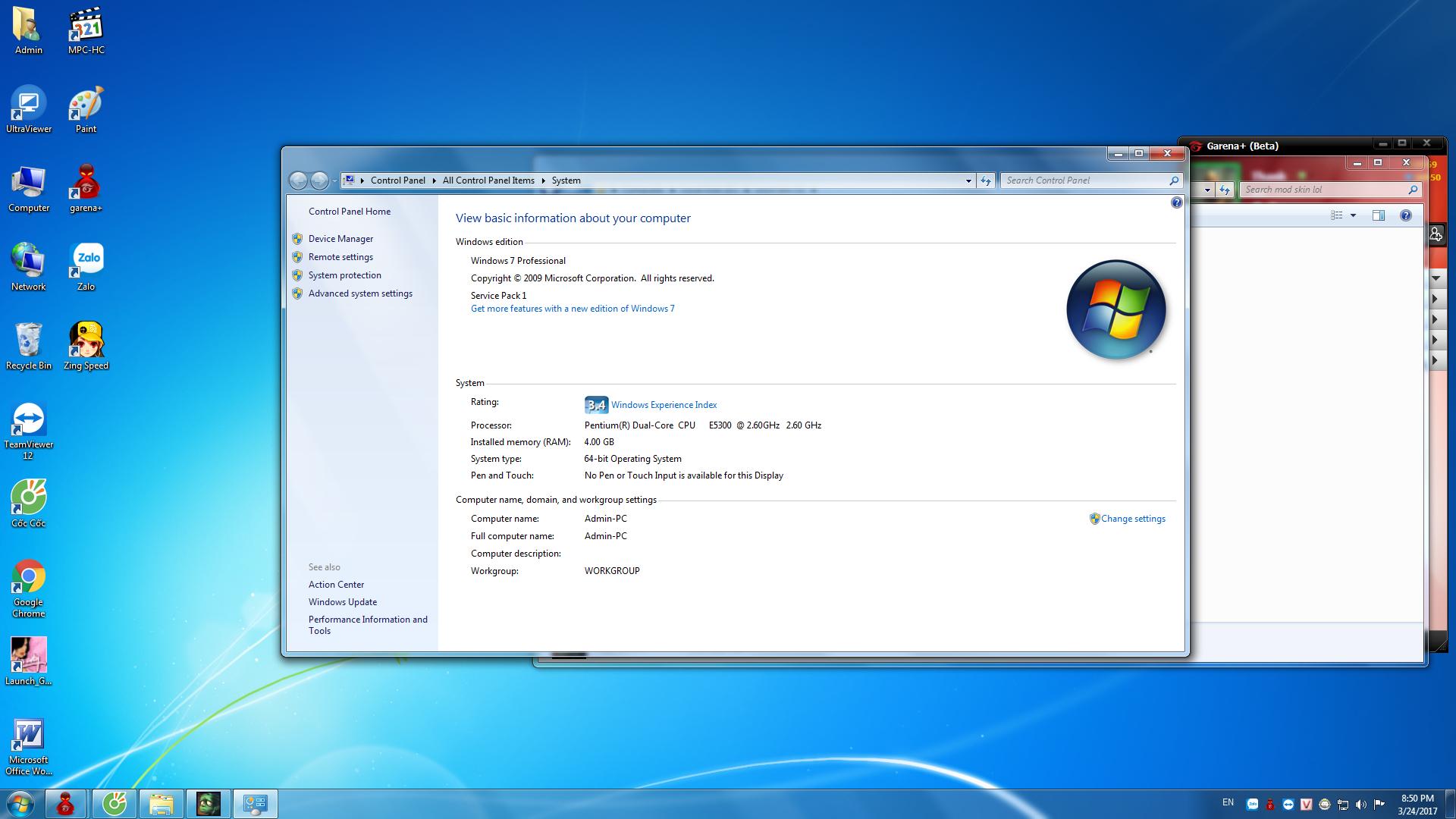
cho coi cấu hình pc của bạn đó
iTPwQOy.jpg
 
set ram cho minecraft nhiều lên ... có 756M .-. làm ăn được j
 
Trạng thái
Không mở trả lời sau này.
Nội dung tương tự Xem nhiều nhất Xem thêm

Thống kê nội dung

Tạo
Vịt mèo,
Trả lời lần cuối từ
Banbeucmas,
Trả lời
9
Lượt xem
557
Quay lại
Trên cùng