


- Tham gia
- 18/12/2016
- Bài viết
- 37
Link:
drive.google.com
Minecraft Versions:

 \
\
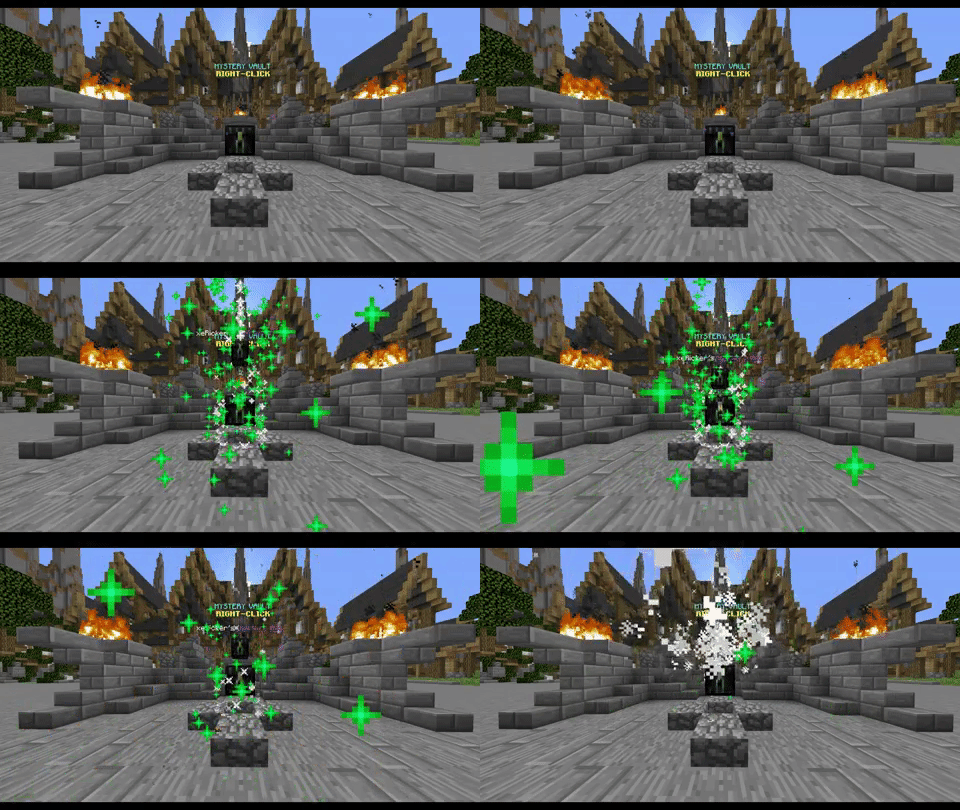
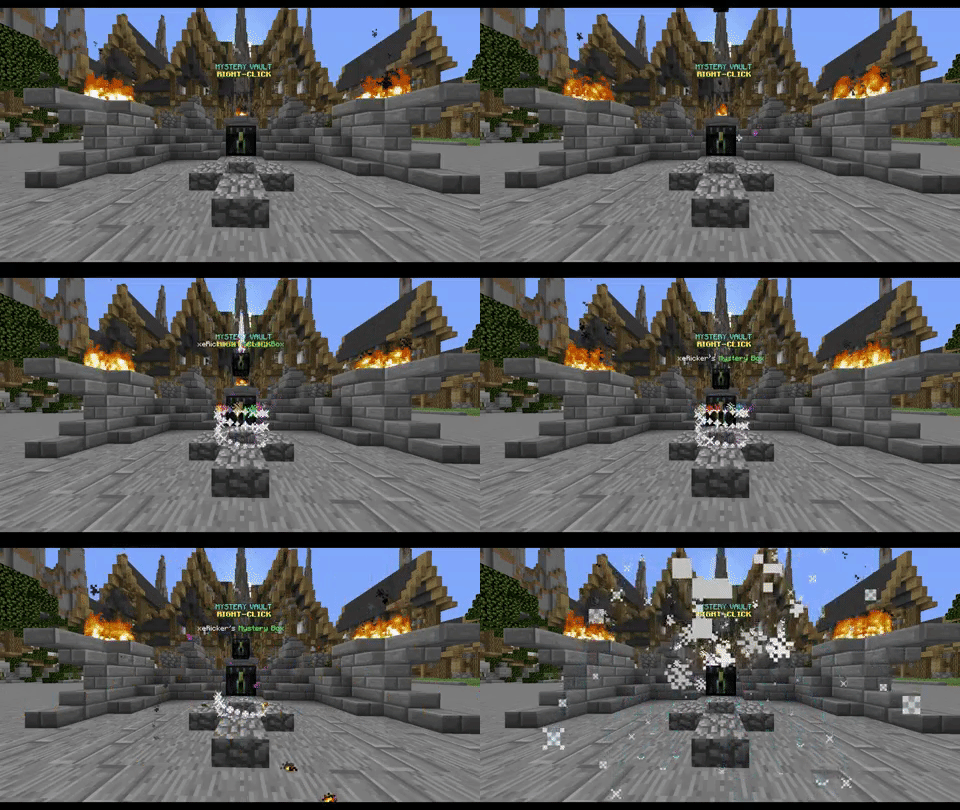
Code (Text):
particles:
mystery-vault:
1: Hiệu Ứng Vòng Lửa :FIREWORKS_SPARK;0;0;0;0;1
2: Đá đỏ :REDSTONE;0;0;0;10;1
mystery-box:
1: FIREWORKS_SPARK;0;0;0;0;1
2: REDSTONE;0;0;0;10;1
charge:
1: ENCHANTMENT_TABLE;0;0;0;1;60
explosion:
1: LAVA;0;0;0;1;15
2: KhóiSMOKE_NORMAL;0;0;0;1;40
3: phun lửaFLAME;0;0;0;1;40
end:
1: nổ :EXPLOSION_NORMAL;1;0.5;1;0;1
2: chí mạng phép: CRIT_MAGIC;0.3;0.3;0.3;0;1
Format: particle name;offset X;offset Y; offset Z;speed;amount
Example: FIREWORKS_SPARK;0;0;0;0;1
falling-mystery-box-name: "{PLAYER}'s &aMystery Box"
falling-mystery-box-name2: "{PLAYER}'s loot: {LOOT_NAME}"
Code (Text):
falling-mystery-box-name: "{PLAYER}'s &aMystery Box"
falling-mystery-box-name2: "{PLAYER}'s loot: {LOOT_NAME}"
falling-mystery-box-type: ENDER_CHEST
falling2-mystery-box-type: IRON_BLOCK
falling-mystery-box-data: 0
falling2-mystery-box-data: 0
falling-mystery-box-head-name: "xeRicker"
falling2-mystery-box-head-name: "Eselyx"
The Mystery Vault opens the GUI from where you can open boxes, transfer boxes, craft boxes or see your statistics. It doesn't have to be an enderchest and the falling block type is configurable as well. It is changing the block type when showing the new loot, making you able to create a nice animation.
Available placeholders:
• %mysteryboxes_amount_<box>% - shows players' Mystery Boxes (example: %mysteryboxes_amount_one_star%).
• %mysteryboxes_statistic_boxes_opened% - shows players' opened boxes.
• %mysteryboxes_statistic_boxes_crafted% - shows players' crafted boxes.
• %mysteryboxes_statistic_boxes_transferred% - shows players' transferred boxes.
• %mysteryboxes_statistic_dust_gained% - shows players' gained boxes.
PlayerData
This object allows you to get player's data.

PERCENTAGE SYSTEM!
Code (Text):
'50' <== 50%
'1' <--- LOOT 1/3, MEANS 50/3% = 16,66% LOOT 1
'2' <--- LOOT 2/3, MEANS 50/3% = 16,66% LOOT 2
'3' <--- LOOT 3/3, MEANS 50/3% = 16,66% LOOT 3
'40' <== 40%
'4' <--- LOOT 1/2, MEANS 40/2% = 20% LOOT 4
'5' <--- LOOT 1/2, MEANS 40/2% = 20% LOOT 5
'10' <== 10%
'6' <--- LOOT 1/2, MEANS 10/2% = 5% LOOT 6
'7' <--- LOOT 1/2, MEANS 10/2% = 5% LOOT 7
This feature adds to your loots percentage system which will make some loots harder to get. First, the plugin selects loot-group based on the percentage. Then, it will select a random loot out of that loot-group (the more loots inside a loot-group, the less chance to get each of it).
PERMISSION TO OPEN CERTAIN MYSTERY BOXES!
Code (Permissions):
permission: "mysteryboxes.open.one_star"
permission-message: "&cYou don't have permission!"
This feature is great when you want for example to disallow non-VIP players from opening certain Mystery Boxes.
MYSQL SUPPORT!
Code (Text):
mysql:
enabled: false
host: "host"
datebase: "datebase"
username: "username"
password: "password"
Once enabled, the plugin will use MySQL to save most of the data. We not recommend to use this option if the connection between your server and MySQL is slow.
How to create Mystery Vault?
• Type "/mb mode set-vault" then right-click a specified block to make it Mystery Vault. It does not have to be an enderchest.
How to create hologram above Mystery Vault?
• We recommend you to use a plugin like HolographicDisplays.
The plugin is not working after I've updated it, what can I do?
• In most cases you need to delete the old configuration files to let the plugin generate new ones.
How to use the plugin's API?
• To use the api you need to import the plugin into your workspace.
Why is the Test Server offline?
• It was probably shut down for maintenance. Please try again later!How to create Mystery Vault?
• Type "/mb mode set-vault" then right-click a specified block to make it Mystery Vault. It does not have to be an enderchest.
How to create hologram above Mystery Vault?
• We recommend you to use a plugin like HolographicDisplays.
The plugin is not working after I've updated it, what can I do?
• In most cases you need to delete the old configuration files to let the plugin generate new ones.
How to use the plugin's API?
• To use the api you need to import the plugin into your workspace.
Why is the Test Server offline?
• It was probably shut down for maintenance. Please try again later!

mysteryboxes.command.menu-main
/mysteryboxes menu main
mysteryboxes.command.menu-craftboxes
/mysteryboxes menu craftboxes
mysteryboxes.command.help
/mysteryboxes help
mysteryboxes.command.reload
/mysteryboxes reload
mysteryboxes.command.license
/mysteryboxes license
mysteryboxes.command.mode-add-vault
/mysteryboxes mode add-vault
mysteryboxes.command.mode-remove-vault
/mysteryboxes mode remove-vault
mysteryboxes.command.mode-set-yaw
/mysteryboxes mode set-yaw
mysteryboxes.command.setmysterydust-all
/mysteryboxes setmysterydust-all
mysteryboxes.command.addmysterydust-all
/mysteryboxes addmysterydust-all
mysteryboxes.command.check
/mysteryboxes check
mysteryboxes.command.open
/mysteryboxes open
mysteryboxes.command.set-all
/mysteryboxes set-all
mysteryboxes.command.add-all
/mysteryboxes add-all
mysteryboxes.command.remove-all
/mysteryboxes remove-all
mysteryboxes.command.setmysterydust
/mysteryboxes setmysterydust
mysteryboxes.command.removemysterydust
/mysteryboxes removemysterydust
mysteryboxes.command.set
/mysteryboxes set
mysteryboxes.command.add
/mysteryboxes add
mysteryboxes.command.remove
/mysteryboxes remove
CONFIG file - pastebin.com
• LANGUAGE file - pastebin.com
PlaceHolderAPI (www.spigotmc.org)
mình ko có time dịch ae thông cảmgoo.gl
ry-box-head-name: "xeRicker"
falling2-mystery-box-head-name: "Eselyx"
The Mystery Vault opens the GUI from where you can open boxes, transfer boxes, craft boxes or see your statistics. It doesn't have to be an enderchest and the falling block type is configurable as well. It is changing the block type when showing the new loot, making you able to create a nice animation.
drive.google.com
Minecraft Versions:
- 1.8
- 1.9
- 1.10
- 1.11
- 1.12
Code (Text):
particles:
mystery-vault:
1: Hiệu Ứng Vòng Lửa :FIREWORKS_SPARK;0;0;0;0;1
2: Đá đỏ :REDSTONE;0;0;0;10;1
mystery-box:
1: FIREWORKS_SPARK;0;0;0;0;1
2: REDSTONE;0;0;0;10;1
charge:
1: ENCHANTMENT_TABLE;0;0;0;1;60
explosion:
1: LAVA;0;0;0;1;15
2: KhóiSMOKE_NORMAL;0;0;0;1;40
3: phun lửaFLAME;0;0;0;1;40
end:
1: nổ :EXPLOSION_NORMAL;1;0.5;1;0;1
2: chí mạng phép: CRIT_MAGIC;0.3;0.3;0.3;0;1
Format: particle name;offset X;offset Y; offset Z;speed;amount
Example: FIREWORKS_SPARK;0;0;0;0;1
falling-mystery-box-name: "{PLAYER}'s &aMystery Box"
falling-mystery-box-name2: "{PLAYER}'s loot: {LOOT_NAME}"
Code (Text):
falling-mystery-box-name: "{PLAYER}'s &aMystery Box"
falling-mystery-box-name2: "{PLAYER}'s loot: {LOOT_NAME}"
falling-mystery-box-type: ENDER_CHEST
falling2-mystery-box-type: IRON_BLOCK
falling-mystery-box-data: 0
falling2-mystery-box-data: 0
falling-mystery-box-head-name: "xeRicker"
falling2-mystery-box-head-name: "Eselyx"
The Mystery Vault opens the GUI from where you can open boxes, transfer boxes, craft boxes or see your statistics. It doesn't have to be an enderchest and the falling block type is configurable as well. It is changing the block type when showing the new loot, making you able to create a nice animation.
Available placeholders:
• %mysteryboxes_amount_<box>% - shows players' Mystery Boxes (example: %mysteryboxes_amount_one_star%).
• %mysteryboxes_statistic_boxes_opened% - shows players' opened boxes.
• %mysteryboxes_statistic_boxes_crafted% - shows players' crafted boxes.
• %mysteryboxes_statistic_boxes_transferred% - shows players' transferred boxes.
• %mysteryboxes_statistic_dust_gained% - shows players' gained boxes.
PlayerData
This object allows you to get player's data.
PERCENTAGE SYSTEM!
Code (Text):
'50' <== 50%
'1' <--- LOOT 1/3, MEANS 50/3% = 16,66% LOOT 1
'2' <--- LOOT 2/3, MEANS 50/3% = 16,66% LOOT 2
'3' <--- LOOT 3/3, MEANS 50/3% = 16,66% LOOT 3
'40' <== 40%
'4' <--- LOOT 1/2, MEANS 40/2% = 20% LOOT 4
'5' <--- LOOT 1/2, MEANS 40/2% = 20% LOOT 5
'10' <== 10%
'6' <--- LOOT 1/2, MEANS 10/2% = 5% LOOT 6
'7' <--- LOOT 1/2, MEANS 10/2% = 5% LOOT 7
This feature adds to your loots percentage system which will make some loots harder to get. First, the plugin selects loot-group based on the percentage. Then, it will select a random loot out of that loot-group (the more loots inside a loot-group, the less chance to get each of it).
PERMISSION TO OPEN CERTAIN MYSTERY BOXES!
Code (Permissions):
permission: "mysteryboxes.open.one_star"
permission-message: "&cYou don't have permission!"
This feature is great when you want for example to disallow non-VIP players from opening certain Mystery Boxes.
MYSQL SUPPORT!
Code (Text):
mysql:
enabled: false
host: "host"
datebase: "datebase"
username: "username"
password: "password"
Once enabled, the plugin will use MySQL to save most of the data. We not recommend to use this option if the connection between your server and MySQL is slow.
How to create Mystery Vault?
• Type "/mb mode set-vault" then right-click a specified block to make it Mystery Vault. It does not have to be an enderchest.
How to create hologram above Mystery Vault?
• We recommend you to use a plugin like HolographicDisplays.
The plugin is not working after I've updated it, what can I do?
• In most cases you need to delete the old configuration files to let the plugin generate new ones.
How to use the plugin's API?
• To use the api you need to import the plugin into your workspace.
Why is the Test Server offline?
• It was probably shut down for maintenance. Please try again later!How to create Mystery Vault?
• Type "/mb mode set-vault" then right-click a specified block to make it Mystery Vault. It does not have to be an enderchest.
How to create hologram above Mystery Vault?
• We recommend you to use a plugin like HolographicDisplays.
The plugin is not working after I've updated it, what can I do?
• In most cases you need to delete the old configuration files to let the plugin generate new ones.
How to use the plugin's API?
• To use the api you need to import the plugin into your workspace.
Why is the Test Server offline?
• It was probably shut down for maintenance. Please try again later!
mysteryboxes.command.menu-main
/mysteryboxes menu main
mysteryboxes.command.menu-craftboxes
/mysteryboxes menu craftboxes
mysteryboxes.command.help
/mysteryboxes help
mysteryboxes.command.reload
/mysteryboxes reload
mysteryboxes.command.license
/mysteryboxes license
mysteryboxes.command.mode-add-vault
/mysteryboxes mode add-vault
mysteryboxes.command.mode-remove-vault
/mysteryboxes mode remove-vault
mysteryboxes.command.mode-set-yaw
/mysteryboxes mode set-yaw
mysteryboxes.command.setmysterydust-all
/mysteryboxes setmysterydust-all
mysteryboxes.command.addmysterydust-all
/mysteryboxes addmysterydust-all
mysteryboxes.command.check
/mysteryboxes check
mysteryboxes.command.open
/mysteryboxes open
mysteryboxes.command.set-all
/mysteryboxes set-all
mysteryboxes.command.add-all
/mysteryboxes add-all
mysteryboxes.command.remove-all
/mysteryboxes remove-all
mysteryboxes.command.setmysterydust
/mysteryboxes setmysterydust
mysteryboxes.command.removemysterydust
/mysteryboxes removemysterydust
mysteryboxes.command.set
/mysteryboxes set
mysteryboxes.command.add
/mysteryboxes add
mysteryboxes.command.remove
/mysteryboxes remove
CONFIG file - pastebin.com
• LANGUAGE file - pastebin.com
PlaceHolderAPI (www.spigotmc.org)
mình ko có time dịch ae thông cảmgoo.gl
ry-box-head-name: "xeRicker"
falling2-mystery-box-head-name: "Eselyx"
The Mystery Vault opens the GUI from where you can open boxes, transfer boxes, craft boxes or see your statistics. It doesn't have to be an enderchest and the falling block type is configurable as well. It is changing the block type when showing the new loot, making you able to create a nice animation.


