• Chào bạn, hãy đăng ký hoặc đăng nhập để tham gia cùng bọn mình và sử dụng được đầy đủ chức năng của diễn đàn :).
S

Hỏi về Plugin Cho e hỏi về click combo của skillAPI

Trạng thái
Không mở trả lời sau này.

sidaconbabanbanhda

THÀNH VIÊN
Tham gia
16/05/2019
Bài viết
65
Làm sao để chỉnh cho nó hiện cái phải trái shift trên màn hình khi mình ấn vậy mấy a e chỉnh như vầy rồi mà k dc :


Click Combos:

# Whether or not to use click combinations
enabled: 'true'

# Whether or not players can customize their combos
allow-custom: 'true'

# Whether or not left clicks are allowed at all
use-click-left: 'true'

# Whether or not right clicks are allowed at all
use-click-right: 'true'

# Whether or not shift clicks are allowed at all
use-click-shift: 'true'

# Whether or not shift clicks are allowed at all
# This will disable "use-click-shift" if enabled
use-click-right-shift: 'true'

# Whether or not shift clicks are allowed at all
# This will disable "use-click-shift" if enabled
use-click-left-shift: 'true'

# Whether or not shift clicks are allowed at all
use-click-space: 'true'
Mong ai đó ai e
*****Nội dung được bổ sung thêm*****
ai biết e sai chỗ nào k ạ :cry2:
 
use-click-right-shift: 'true' = False
use-click-left-shift: 'true' = False
allow-custom: 'true' = False
*****Nội dung được bổ sung thêm*****
GUI:

# Whether or not to lock the health bar to 10 hearts
# This does not affect total health, only the display
old-health-bar: 'true'

# Whether or not to force SkillAPI to override
# health scaling of other plugins
force-scaling: 'false'

# This is what to display using the level bar, if anything.
# Options are: none, mana, level
level-bar: 'none'

# This is what to display using the food bar, if anything.
# Options are: none, mana, exp
food-bar: 'none'

# Whether or not to use the action bar
use-action-bar: 'true'

# The text to display on the action bar.
# Available filters:
# {combo} - the player's current click combo
# {class} - the player's main class name
# {level} - the player's main class level
# {exp} - the player's main class exp
# {expReq} - the player's main class required experience
# {expLeft} - the player's main class experience until the next level
# {health} - the player's current health
# {maxHealth} - the player's max health
# {mana} - the player's current mana
# {maxMana} - the player's max mana
# {name} - the name of the player
# {attr} - the player's attribute points
# {sp} - the player's main class skill points
# {value:<key>} - a skill value
action-bar-text: '{combo}'

# Whether or not to use title messages
title-enabled: 'true'

# Duration for title messages in seconds
title-duration: '3'

# Fade in time for title messages in seconds
title-fade-in: '0.5'

# Fade out time for title messages in seconds
title-fade-out: '0.5'


Chỉnh cái action-bar-text: '{combo}'
*****Nội dung được bổ sung thêm*****
Và Enable cái Action bar nhé
 
tks a nhìu
*****Nội dung được bổ sung thêm*****
use-click-right-shift: 'true' = False
use-click-left-shift: 'true' = False
allow-custom: 'true' = False


à cho e hỏi chỉnh cái action-bar-text là chỉnh sao vậy a và làm sao enable cái Action bar
e chỉnh thế này đúng k a:
# Whether or not players can customize their combos
allow-custom: 'false'
# Whether or not shift clicks are allowed at all
# This will disable "use-click-shift" if enabled
use-click-right-shift: 'false'

# Whether or not shift clicks are allowed at all
# This will disable "use-click-shift" if enabled
use-click-left-shift: 'flase# Whether or not shift clicks are allowed at all
# This will disable "use-click-shift" if enabled
use-click-right-shift: 'true'

# Whether or not shift clicks are allowed at all
# This will disable "use-click-shift" if enabled
use-click-left-shift: 'true'

'
*****Nội dung được bổ sung thêm*****
tks a e làm dc rồi :hp:
'
*****Nội dung được bổ sung thêm*****
cho e hỏi làm sao để chỉnh lại cái combo của skill vậy a e lên eniripsa96.github.io chỉnh thành L,R,L rồi down về mà nó cũng như cũ
 
'
*****Nội dung được bổ sung thêm*****
cho e hỏi làm sao để chỉnh lại cái combo của skill vậy a e lên eniripsa96.github.io chỉnh thành L,R,L rồi down về mà nó cũng như cũ
[/QUOTE]
ý bạn là ntn ?
 
*****Nội dung được bổ sung thêm*****
cho e hỏi làm sao để chỉnh lại cái combo của skill vậy a e lên eniripsa96.github.io chỉnh thành L,R,L rồi down về mà nó cũng như cũ
ý bạn là ntn ?[/QUOTE]
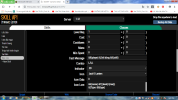
ý e là phần combo lúc mình chỉnh skill thì e phải làm sao để trong game nó có cái combo mà mình chỉnh
e chỉnh là phải trái trái thì trong game nó vẫn là trái trái trái trái


'
 
Cho mình xem hình phần bạn chỉnh trong skill
 
Uh đúng rồi chụp mang qua đây
*****Nội dung được bổ sung thêm*****
tks a nhìu
*****Nội dung được bổ sung thêm*****


à cho e hỏi chỉnh cái action-bar-text là chỉnh sao vậy a và làm sao enable cái Action bar
e chỉnh thế này đúng k a:
# Whether or not players can customize their combos
allow-custom: 'false'
# Whether or not shift clicks are allowed at all
# This will disable "use-click-shift" if enabled
use-click-right-shift: 'false'

# Whether or not shift clicks are allowed at all
# This will disable "use-click-shift" if enabled
use-click-left-shift: 'flase# Whether or not shift clicks are allowed at all
# This will disable "use-click-shift" if enabled
use-click-right-shift: 'true'

# Whether or not shift clicks are allowed at all
# This will disable "use-click-shift" if enabled
use-click-left-shift: 'true'

'
*****Nội dung được bổ sung thêm*****
tks a e làm dc rồi :hp:
'
*****Nội dung được bổ sung thêm*****
cho e hỏi làm sao để chỉnh lại cái combo của skill vậy a e lên eniripsa96.github.io chỉnh thành L,R,L rồi down về mà nó cũng như cũ
Cái này sai r`
*****Nội dung được bổ sung thêm*****
Click Combos:

# Whether or not to use click combinations
enabled: 'true'

# Whether or not players can customize their combos
allow-custom: 'false'

# Whether or not left clicks are allowed at all
use-click-left: 'true'

# Whether or not right clicks are allowed at all
use-click-right: 'true'

# Whether or not shift clicks are allowed at all
use-click-shift: 'true'

# How many clicks are needed to perform a combo
combo-size: '4'

# Inactivity time in seconds before clicks for a combo are reset
click-time: '2.0'

# Whether or not to automatically assign combos to skills
# without a combo manually defined. When disabled, only skills
# configured to have a combo or have had a combo set by
# a command will have combos.
auto-assign: 'true'

# Whether or not right shift clicks are allowed at all
# This will disable "use-click-shift" if enabled
use-click-right-shift: 'false'

# Whether or not left shift clicks are allowed at all
# This will disable "use-click-shift" if enabled
use-click-left-shift: 'false'

# Whether or not jump clicks are allowed at all
use-click-space: 'false'

# Whether or not Q clicks are allowed at all.
# Enabling this disables dropping items via Q outside of menus.
use-click-q: 'false'
 

Đính kèm

  • Untitledsdf.png
    Untitledsdf.png
    223.9 KB · Lượt xem: 42
k có , L R L
*****Nội dung được bổ sung thêm*****
Bạn xoá phần Click Combo của bạn rồi thêm phần của mình vào
 
Trạng thái
Không mở trả lời sau này.
Similar content Most view Xem thêm
Back
Top Bottom